LO5
Reflection on my progress this week I can say this I have accomplished everything that I set out to do at the beginning of the week in my 'plan of the week'. This week is the last of the digital skills lessons so the next week leading up to the deadline will be the only time I get to prepare for hand-in.

Showing posts with label Digital Skills. Show all posts
Showing posts with label Digital Skills. Show all posts
31 January 2013

30 January 2013
Digital Skills - Week 5/Day 1
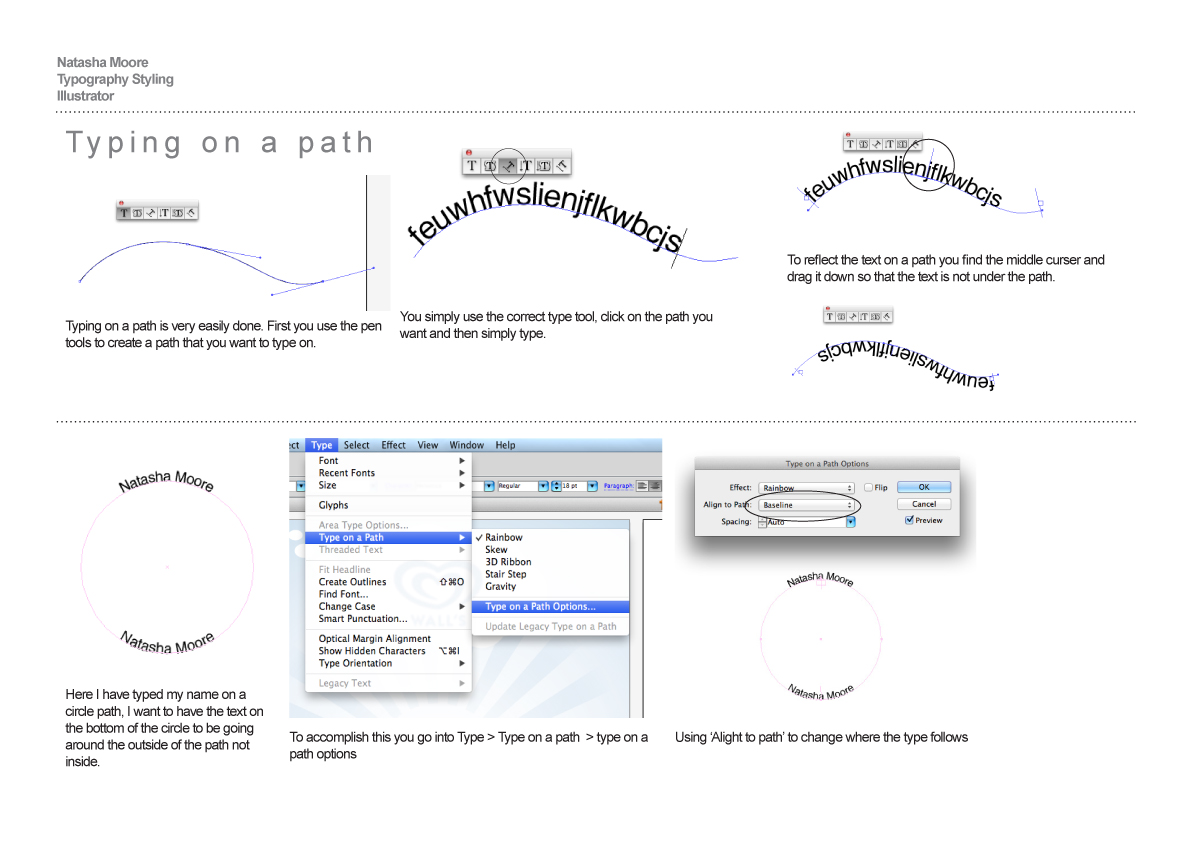
This lesson is all about using Illustrator, the skills include...
1. Typography formatting / Tracking / Kerning
2. Create Outlines / direct selection tool / point manipulation
3. Warp options / Envelope distort / Type on a path
4. 3D options
5. Appearance palette options
After going through the skills I was given the task to use them to create a Thomas holiday press add and a Adidas press add. I've included my final outcomes below with my evaluations.




28 January 2013
Plan of the week
LO2
The plan for this week is to continue the digital skills lessons. After the lessons on Monday and Tuesday I will compile all my screen grabs in a InDesign documents and write about the process and evaluate the skills that I've learned and developed. When I have finished my InDesign pages I also want to blog about them.
The plan for this week is to continue the digital skills lessons. After the lessons on Monday and Tuesday I will compile all my screen grabs in a InDesign documents and write about the process and evaluate the skills that I've learned and developed. When I have finished my InDesign pages I also want to blog about them.
27 January 2013
Weekly Reflection
LO5
Looking back I've managed to stay on task and also managed to update the blog with my InDesign documents, final outcomes and evaluations.
Looking back I've managed to stay on task and also managed to update the blog with my InDesign documents, final outcomes and evaluations.
25 January 2013
Digital Skills - Week 4/Day 1
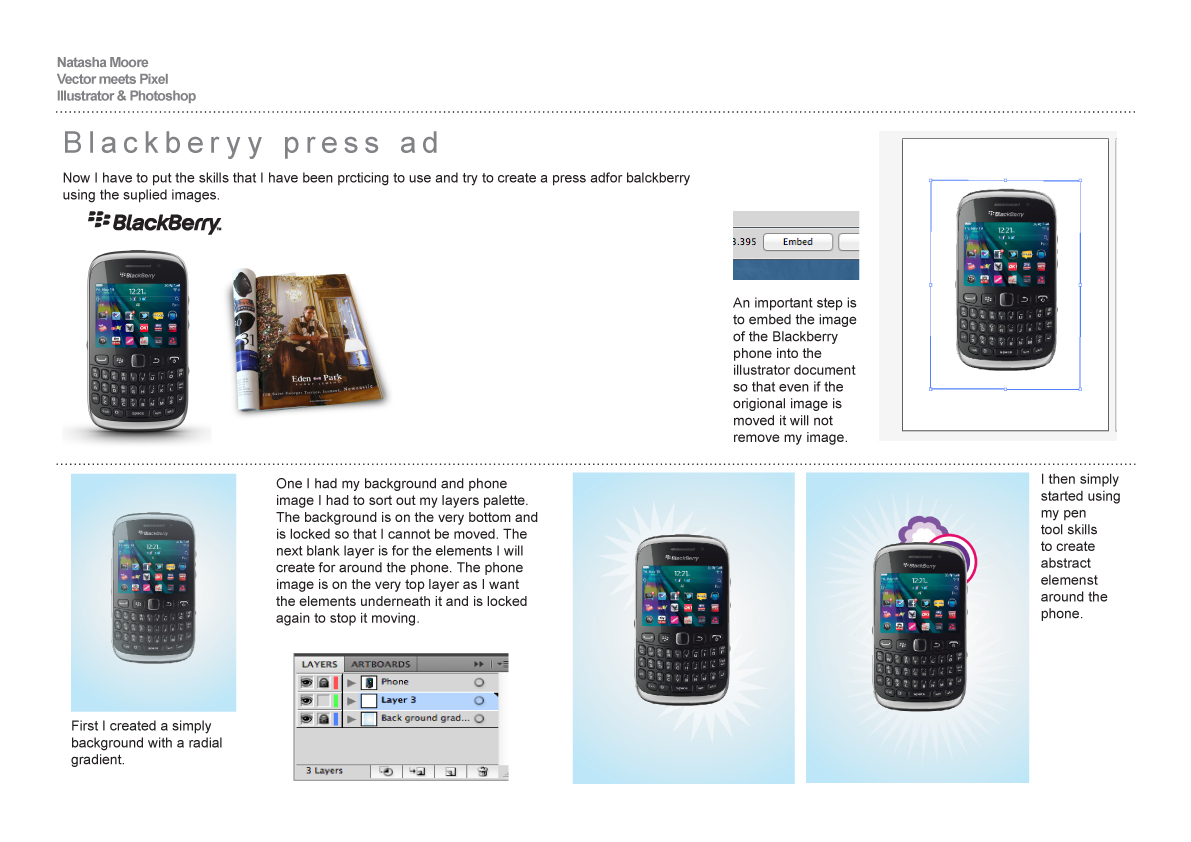
This lesson is all about using Illustrator and Photoshop together, the skills include...
1. Shapes tool / pen tool
2. rotate tool option
3. Stroke options
4. Pathfinder options
5. Transform options
After going through the skills I was given the task to use them to create a Thomas holiday press add and a Adidas press add. I've included my final outcomes below with my evaluations.


1. Shapes tool / pen tool
2. rotate tool option
3. Stroke options
4. Pathfinder options
5. Transform options
After going through the skills I was given the task to use them to create a Thomas holiday press add and a Adidas press add. I've included my final outcomes below with my evaluations.




21 January 2013
Plan of the week
LO2
The plan for this week is to continue the digital skills lessons. After the lessons on Monday and Tuesday I will compile all my screen grabs in a InDesign documents and write about the process and evaluate the skills that I've learned and developed. When I have finished my InDesign pages I also want to blog about them.
The plan for this week is to continue the digital skills lessons. After the lessons on Monday and Tuesday I will compile all my screen grabs in a InDesign documents and write about the process and evaluate the skills that I've learned and developed. When I have finished my InDesign pages I also want to blog about them.
20 January 2013
Weekly Reflection
LO5
Looking back I've managed to stay on task and also managed to update the blog with my InDesign documents, final outcomes and evaluations.
Looking back I've managed to stay on task and also managed to update the blog with my InDesign documents, final outcomes and evaluations.
15 January 2013
Digital Skills - Week 3/Day 2
This lesson is all about using Illustrator and Photoshop together, the skills include...
1. Layer masks
2. Transform tools
3. Typography formatting
After going through the skills I was given the task to use them to create a Thomas holiday press add and a Adidas press add. I've included my final outcomes below with my evaluations.


14 January 2013
Plan of the week
LO2
The plan for this week is to continue the digital skills lessons. After the lessons on Monday and Tuesday I will compile all my screen grabs in a InDesign documents and write about the process and evaluate the skills that I've learned and developed.
The plan for this week is to continue the digital skills lessons. After the lessons on Monday and Tuesday I will compile all my screen grabs in a InDesign documents and write about the process and evaluate the skills that I've learned and developed.
13 January 2013
Weekly Reflection
LO5
Looking back I've managed to stay on task and also managed to update the blog with my InDesign documents, final outcomes and evaluations.
Looking back I've managed to stay on task and also managed to update the blog with my InDesign documents, final outcomes and evaluations.
11 January 2013
Digital Skills - Week 2/Day 2
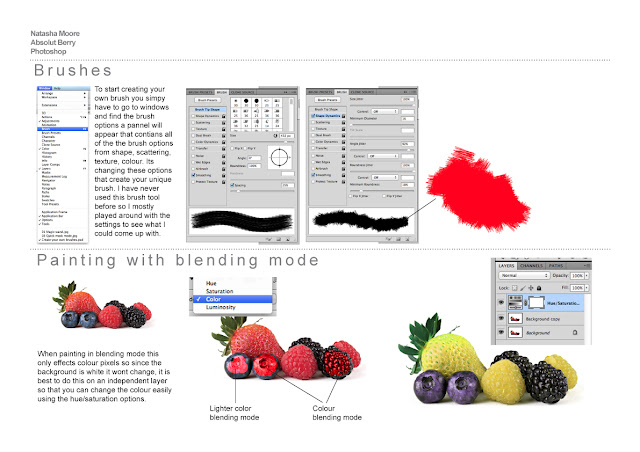
This lesson is all about using Photoshop the skills include
1. Selections /Refine edge options /clipping masks
2. Creating gradients / Brushes /Creating your own brushes
3. Painting with blending modes
4. Adjustment layers



1. Selections /Refine edge options /clipping masks
2. Creating gradients / Brushes /Creating your own brushes
3. Painting with blending modes
4. Adjustment layers


After going through the skills in Photoshop, I was given the task to use all these skills to create a Absout Berry press add. I've included my final outcome below with my evaluation.

9 January 2013
Digital Skills - Week 2/Day 1
I thought I'd post my final InDesign documents showing the skills I've learned and developed and my evaluations. This lesson is all about using Photoshop for image styling the skills include...
1. Levels (tonality)
2. Blending modes
3. Colour correction / replacement / saturation


1. Levels (tonality)
2. Blending modes
3. Colour correction / replacement / saturation


7 January 2013
Plan of the week
LO2
The plan for this week is to start the digital skills lessons. After the lessons on Monday and Tuesday I will compile all my screen grabs in a InDesign documents and write about the process and evaluate the skills that I've learned and developed.
The plan for this week is to start the digital skills lessons. After the lessons on Monday and Tuesday I will compile all my screen grabs in a InDesign documents and write about the process and evaluate the skills that I've learned and developed.
New Brief
LO3/LO1
Well first day back to college and the start of a new brief. This new module is called Digital Skills. Throughout this module, I will attend IT sessions on a Monday and Tuesday in Zone 1.
Where I will be introduced to the industry standard packages learning digital skills for Photoshop, Illustrator and InDesign. I will be introduced to the principles of software skills and will be given tasks and exercises to help equip myself with the necessary skills that I will need for industry. I will be given multiple exercises and tasks applying my design and technical skills to generate creative outcomes.
There will be research tasks throughout this module, helping me evaluate, annotate and reflect on my digital skills process and learning. The best way to do this is by screen grabs, I will then put them in an InDesign document and evaluate my development.
30 January 2012
Digital Skills - Photoshop
Another digital skills lesson so I thought I'd post what I did. This lesson started in Illustrator using the type tools to create a giant 'N' and then placing my name inside it at different sizes and angles. I then moved it into Photoshop where I learnt a lot about how to use textures, which was something new as I've never tried it before. I didn't get time to completely finished the 'N' but I liked this lesson and I learnt some new things about Photoshop.


17 January 2012
Editorial Task & Digital Skills
In class we were given a task to help with the new editorial and typographic brief. We learned how to set up a basic 2 page spread and all the measurements that you use. I then looked through some magazine and mocked up a spread of my own.


This is a photograph of the first double page spread that I designed. After I tried it roughly on just paper the class then moved on to trying it on the computer in a digital skills lesson.

This is my final digital spread that we did in the lesson.We used Indesign which was hard to get the hang of first but after you master the basics its quite simple and an easy tool to use when it comes to creating a spread.
12 January 2012
Digital Skills - Milk Type
For last Fridays digital skills lesson we had a go at Photoshop and learned how to manipulate photo's and use some of the tool available like the clone stamp, the eraser, the blur and transform tools.
We started out in Illustrator with these plain black boxes which with anchor tools I made them into the word milk.
After I made the letters in Illustrator I brought it over into Photoshop and started using photo's of milk splashes and manipulating them so it looked like they were part of the letters themselves.
I just continued using photo's of milk splashed with all four letters and tweaked them until they were blended together.
This is a screen shot of my final image, I really liked this digital skills lesson because I learned how to use a lot of different tool in Photoshop that never knew about before, I also learned more about blending images together and a brilliant thing in the Layer options, New Adjustment Layer>Gradient map, which helped the milk in the image all look the same shade of white, giving the image a more professional look.
 |
| Starting Point |
We started out in Illustrator with these plain black boxes which with anchor tools I made them into the word milk.
 |
| Modified Blocks |
After I made the letters in Illustrator I brought it over into Photoshop and started using photo's of milk splashes and manipulating them so it looked like they were part of the letters themselves.
 |
| Using Photoshop |
I just continued using photo's of milk splashed with all four letters and tweaked them until they were blended together.
 |
| Final Image |
This is a screen shot of my final image, I really liked this digital skills lesson because I learned how to use a lot of different tool in Photoshop that never knew about before, I also learned more about blending images together and a brilliant thing in the Layer options, New Adjustment Layer>Gradient map, which helped the milk in the image all look the same shade of white, giving the image a more professional look.
Subscribe to:
Posts (Atom)